Firstly, what does SSH mean? Well, it stands for Secure Shell, and it allows users to securely connect to and manage other systems remotely. By using SSH, you can execute commands like cd, mkdir, etc without physically needing to be on a system.
Lab Environment
Virtual Machine - VMware Workstation Pro
Remote Access (SSH) - PuTTY
Operating System (ISO Image) - Red Hat Enterprise Linux 10.2 (DVD ISO)
#PuTTY is a simpler GUI-based SSH client that makes it easier to connect to a system remotely; however, I will also show the conventional way to do so, straight from the command line.
How To SSH
Using SSH is fairly straightforward; you just need the server name and hostname or IP address of the system you want to log into. However, let's check to see if SSH is installed on your system.
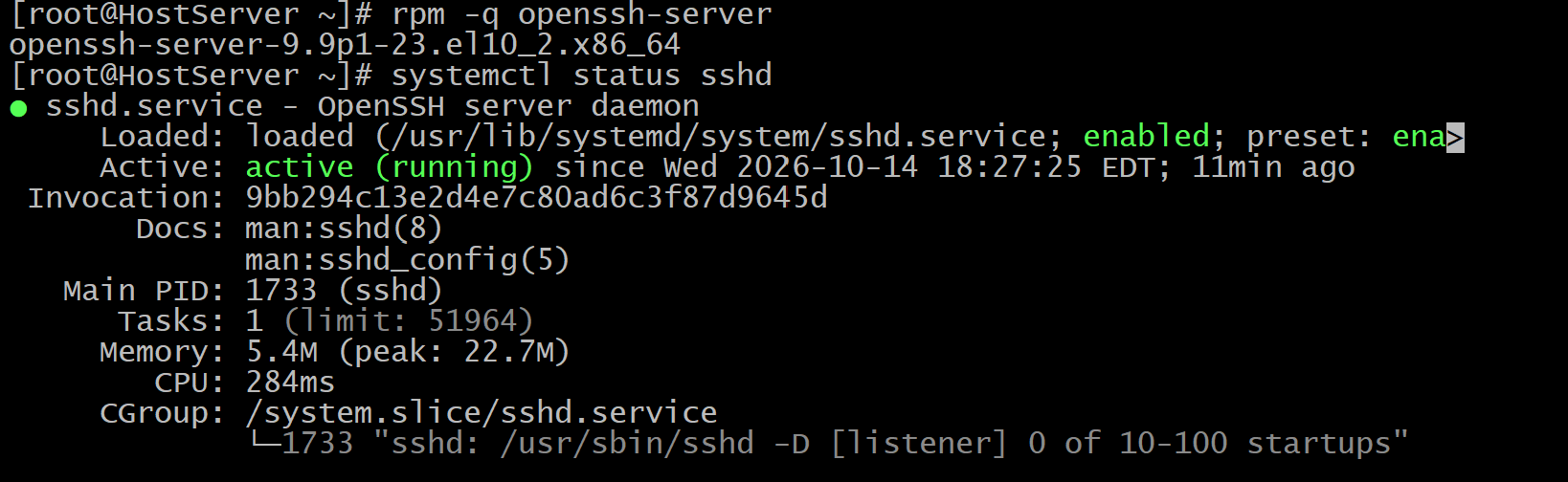
Use the command rpm -q openssh-server to see if SSH is installed, as well as which version is installed; then use systemctl status sshd to see if SSH is running properly.
rpm - Manages packages on Red Hat-based Linux distros.
-q - Stands for Query and retrieves information about installed packages.
systemctl - Used to control the system and service manager.
status - Is an argument/subcommand that checks the status of a package to see if it's enabled or not.
There are other types of SSH commands too, like openssh-clients and openssh; here's what you should know about them:
openssh-clients - Provides tools like the SSH command that allow the MAIN SERVER to SSH to other systems
openssh-server - Provides tools that allow OTHER Firstly, what does SSH mean? Well, it stands for Secure Shell, and it allows users to securely connect to and manage other systems remotely. By using SSH, you can execute commands like cd, mkdir, etc without physically needing to be on a system.
Lab Environment
Virtual Machine - VMware Workstation Pro
Remote Access (SSH) - PuTTY
Operating System (ISO Image) - Red Hat Enterprise Linux 10.2 (DVD ISO)
#PuTTY is a simpler GUI-based SSH client that makes it easier to connect to a system remotely; however, I will also show the conventional way to do so, straight from the command line.
How To SSH
Using SSH is fairly straightforward; you need the username on the destination system and its hostname or IP address. of the system you want to log into. However, let's check to see if SSH is installed on your system.
Use the command rpm -q openssh-server to see if SSH is installed, as well as which version is installed; then use systemctl status sshd to see if SSH is running properly.
rpm - Manages packages on Red Hat-based Linux distros.
-q - Stands for Query, and retrieves information about installed packages.
systemctl - Used to control the system and service manager.
status - Is an argument/subcommand that checks the status of a package to see if it's running or not.
There are different types of SSH packages too, like openssh-client and openssh; here's what you should know about them:
openssh-clients - Provides tools such as the SSH command that allow the client system to connect to other systems.
openssh-server - Provides the SSHD service that allows servers to connect to your system.
openssh - Supports both server and client by providing them with the utilities that they need to SSH to your server.
Step-by-Step Guide
Now that you've checked if SSH is installed, you want to find the username of the account you want to log in to and the hostname and/or destination hostname of the system that you want to remotely access.
To find the username of the person that you want to log in as, use the command whoami, which will show the name of the currently logged-in account.

The hostname is always after the "@":

You can also use the command hostname to find it

The hostname in this instance is "HostServer". Alternatively, you can use the host's IP address with the command ip a, which shows all of your system's IPs.
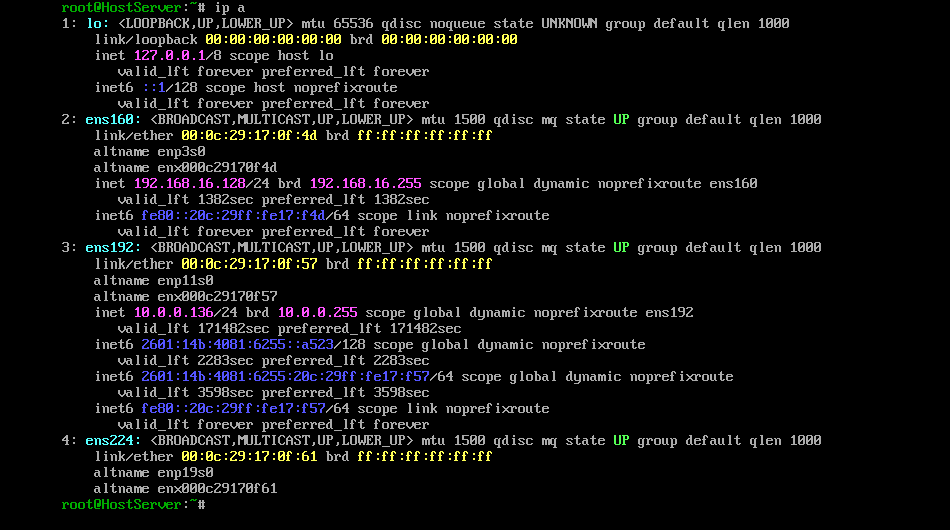
In this case, I am going to use the IP "10.0.0.136"
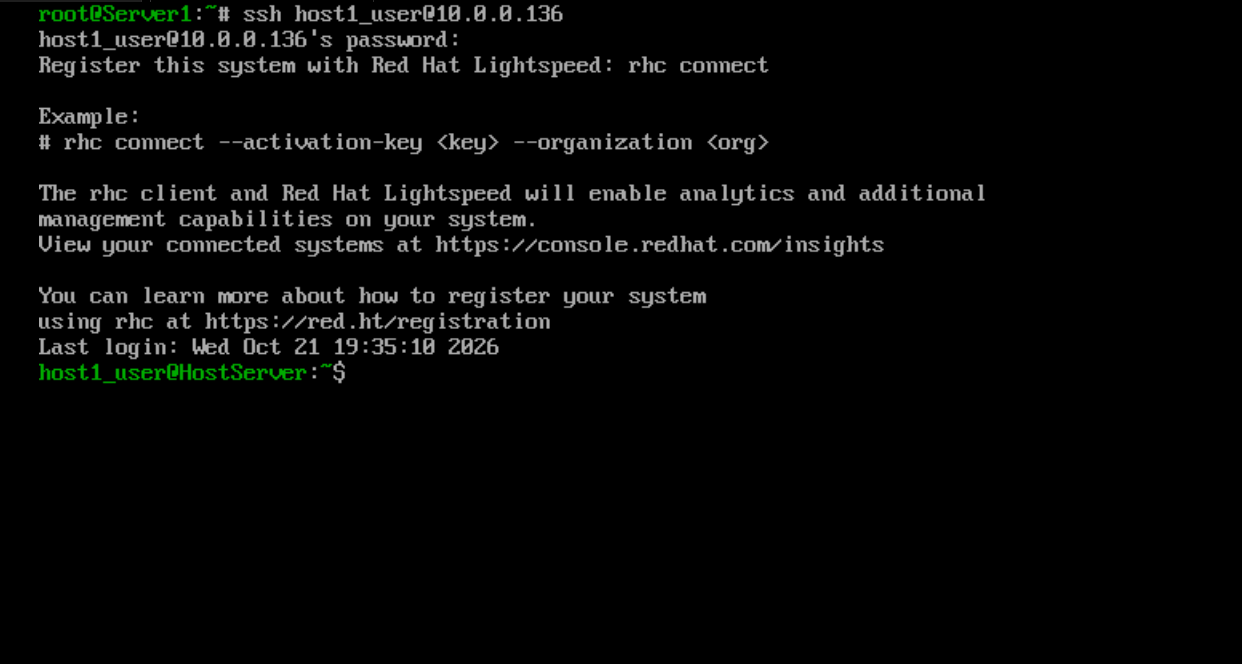
Now, I am going to connect to the "HostServer" using SSH.
Conclusion
Now we know the purpose of the SSH command, how to connect/download the SSH package, and how to connect to other systems using SSH.
About the author
- My name is Zacharie, and I am a freshman studying Computer Engineering. I am very interested in Linux and have experience with RHEL, as well as a Red Hat Systems Administration Certification.
Comments
Join the discussionNo comments yet. Be the first to comment.